Access the Internal Job Board via iCIMS
- Click here: Internal Postings
- Log in using your iCIMS credentials. Your username is your Y email address.
- If you need to reset your password, select “Reset Password” on the login page.
- Please note: the reset email may take a few minutes to arrive and could land in your spam/junk folder.
- If further password assistance is needed, you may contact your Talent Acquisition Partner.
Access the Internal Job Board via UltiPro
- You can also find the Internal Job Board link through your UltiPro account.
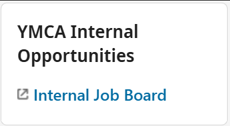
- Simply scroll down your dashboard to the “YMCA Internal Opportunities” tab.
To access UltiPro, use the following link: UltiPro
Your UltiPro username format is:
First Initial + Full Last Name + 2-digit month + 2-digit birth day
(Example: Jdoe0101)